System Messages by Learning units
The final section on each learning unit is the System Messages tab (1). This tab will always appear empty before the learning unit has been saved. After the save, the system generated messages that are sent out by the individual settings will be activated and appear. Each message has a triggering event (2), the system message (3), the time the message will be sent (before, after, immediately) (4), and the recipients of the message (Learners, Supervisors, individual Administrators or Superadministrators) (5). The available recipients is dependent on the type of learning unit being created.
Each message can be previewed by clicking on the mail symbol (6).
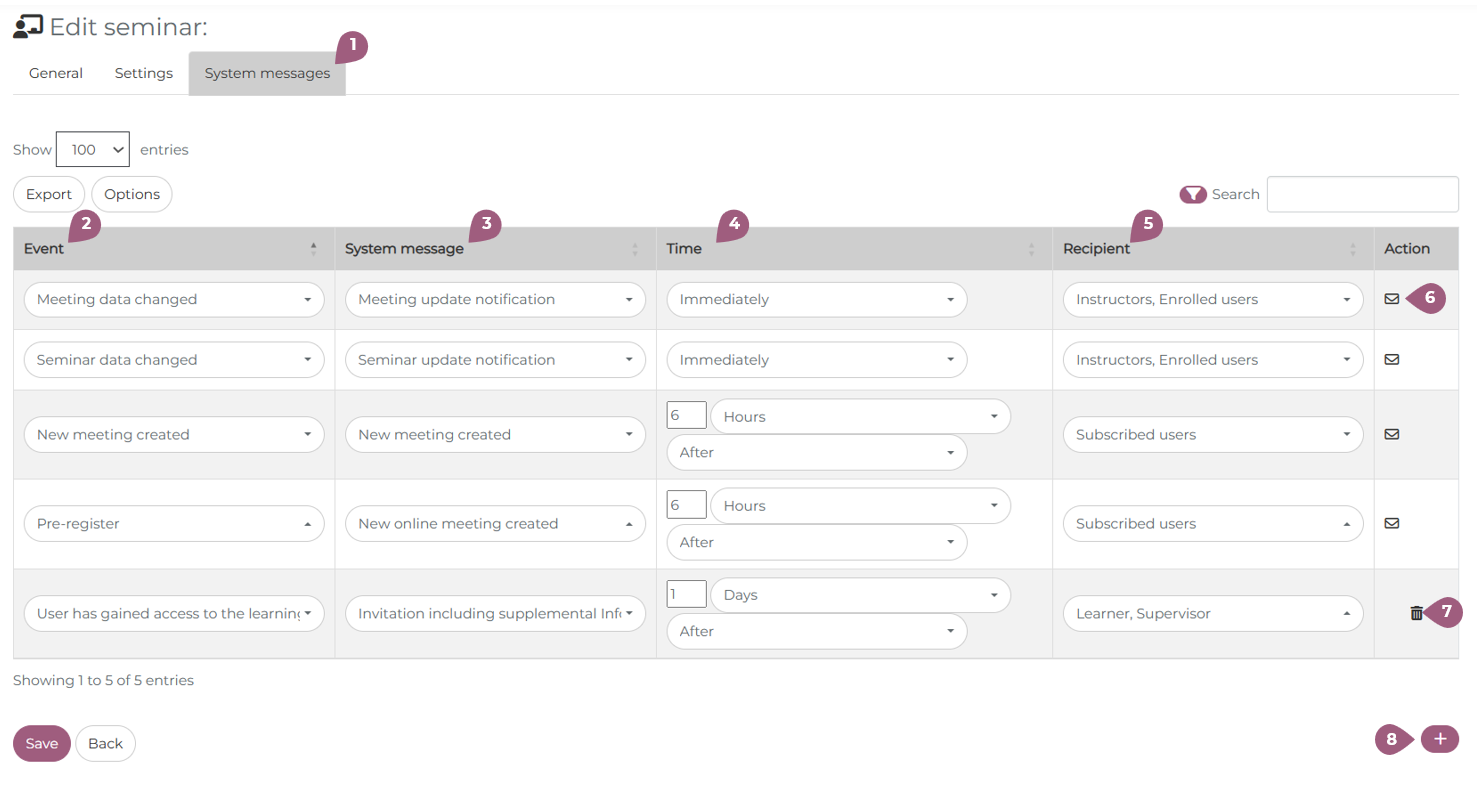
Before saving and after saving, it is possible to add a custom message to the learning unit. This can be accomplished by clicking on the + button (8). Like with the system-generated messages, an event, message, time, and recipient must be selected. The message can be deleted with a click on the trash can (7). Only user-defined system messages can be deleted.
Note: Only custom system messages can be used in this selection process. You can download a list of the all events, times, and recipients that can be used here: Custom System Messages from v4.3